
Building a Room Transcription App on the 4th-Generation Apple TV 4K
The 4th-generation Apple TV 4K has the hardware for hands-free Siri, while tvOS 27.2 SDK boundaries and room constraints govern where a third-party app puts audio capture, transcription, model inference, and reviewed records.



This post is AI augmented.
I used LLMs for research and some writing help, since English isn’t my first language. Still, I personally guide and edit the writing because I don’t want to publish AI slop.
This blog is for my own understanding and to look back on later. It’s a place to write down my projects and research related to things I’m working on.
ARCHITECTURAL OVERVIEW · 4TH-GENERATION APPLE TV 4K
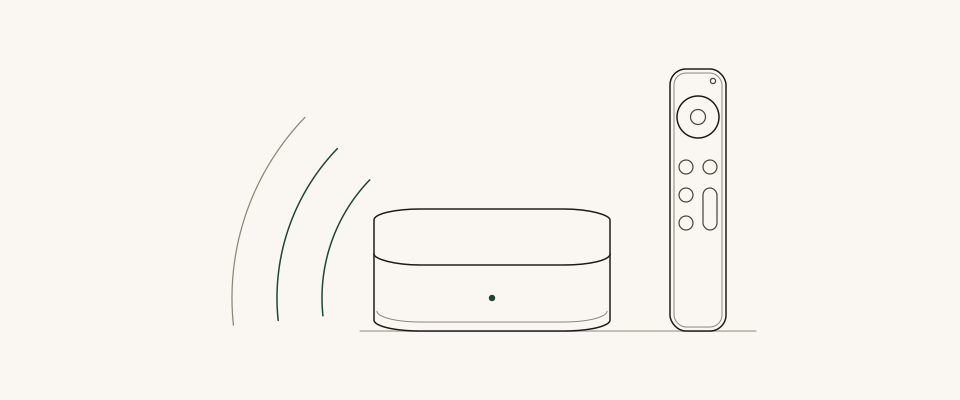
If you are building a room-transcription app for a conference room where an Apple TV 4K is mounted behind the wall display, and the app needs to record a meeting, transcribe the conversation, and draft a structured summary for a participant to review, running that work on the box in the room is an obvious idea to evaluate. Apple's October 13, 2026 announcement of the 4th-generation Apple TV 4K makes that question immediate: the new model adds an A19 chip and built-in far-field microphones for hands-free Siri ahead of its November 13 retail release.
Designing that app requires separating what Apple built for Siri from what tvOS exposes to third-party code. On the new hardware, Apple TV 4K and the A19 chip include Secure Exclaves to process microphone data in compartmentalized runtimes, and data processed and analyzed inside them cannot be accessed by tvOS or apps. Apple's published specifications do not state whether third-party apps can select the built-in microphone array as an audio input, and even if retail hardware exposes that feed, a microphone tuned to catch a short wake phrase across a room still needs to be tested on long multi-speaker conversations. Once an app has a working microphone source, such as a paired Continuity Camera iPhone, the installed tvOS 27.2 SDK supports on-device transcription through SpeechTranscriber.
Summarizing that transcript into a reviewed record hits a moving SDK boundary. In the installed Xcode 27.2 (AppleTVOS27.2.sdk) baseline checked on November 4, 2026, SystemLanguageModel and the session and cloud model classes in Foundation Models are marked unavailable on tvOS, while live web documentation fetched the same day lists tvOS 27.3 beta for SystemLanguageModel. On the tvOS 27.2 baseline, that leaves three design alternatives to evaluate until you can test a matching 27.3 beta SDK on retail hardware: running custom model weights on the A19 chip if a model fits runtime memory, relaying transcript chunks to a companion iPhone or iPad, or calling an HTTPS backend. Because Core AI model caches on tvOS are purgeable and a wall screen is visible to the whole room, the architecture recommended here places participant review and the authoritative saved record on a personal device or backend server regardless of which inference route you choose.
AT A GLANCE · HARDWARE, SIRI AI, AND TVOS 27.2 APP SURFACE
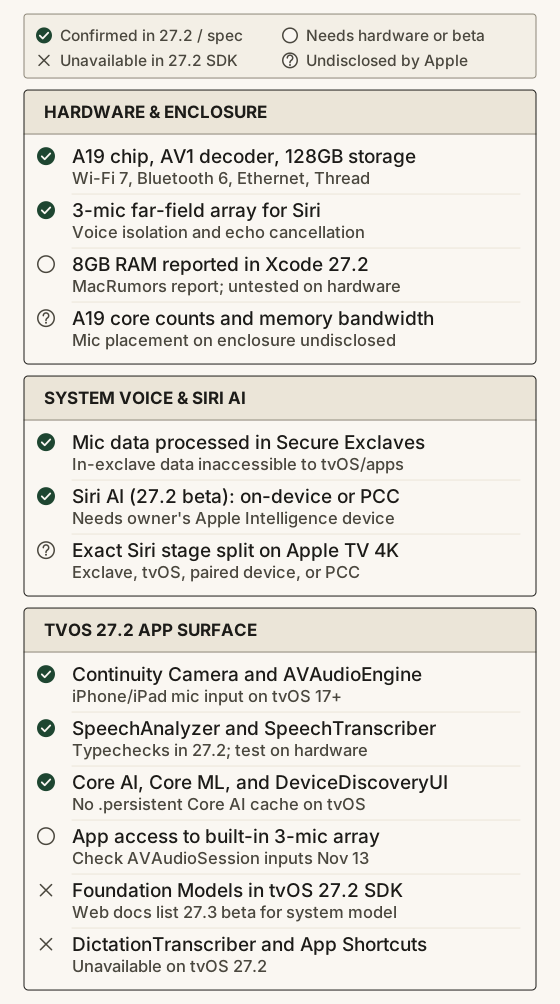
Hardware changes across Apple TV 4K generations
Evaluating the 4th-generation Apple TV 4K as an application target starts with what changed from the 3rd-generation (A15 Bionic) and 2nd-generation (A12 Bionic) models across audio capture, compute, memory, networking, and storage. Earlier Apple TV 4K enclosures had no built-in microphones; before Continuity Camera added iPhone and iPad microphone capture in tvOS 17, Apple TV voice input used the push-to-talk microphone on the Siri Remote. The 4th-generation technical specifications add a three-microphone far-field array with voice isolation inside a 93.24 × 93.24 × 31.00 mm (217 g) enclosure alongside a 4th-generation Siri Remote with USB-C charging, Bluetooth 6, and Precision Finding.
Compute and memory determine what can run locally after audio enters the box. The processor moves from the A15 Bionic to the A19 chip, which Apple states delivers up to 50 percent faster CPU performance and up to 2x faster GPU performance than the previous generation, plus a dedicated AV1 decoder. Those percentages are Apple's marketing comparisons against the 3rd-generation model rather than measured language-model throughput, and Apple does not publish CPU core counts, GPU core counts, RAM, or memory bandwidth on the specification sheet. On October 29, 2026, MacRumors reported that device strings in Xcode 27.2 list 8GB of RAM for the 4th-generation Apple TV 4K. That 8GB figure remains a reported Xcode value until retail units are inspected, and represents total system memory rather than an app's per-process allocation.
For local networking and storage, Apple replaces the 3rd generation's split 64GB Wi-Fi and 128GB Wi-Fi + Ethernet tiers with a single 128GB configuration that includes Gigabit Ethernet, Wi-Fi 7 (802.11be) with 2x2 MIMO, Bluetooth 6, and Thread. A footnote on the HDMI 2.1 port specifies that output is scoped to 4K 60-fps HDR video, Audio Return Channel (ARC or eARC), and Quick Media Switching (QMS) only. Standardizing on 128GB of flash storage and including both Gigabit Ethernet and Wi-Fi 7 on every unit gives developers local disk capacity for cached speech and model assets and wired or wireless links to companion devices in the room.
TABLE 1 · APPLE TV 4K HARDWARE GENERATIONS
| Specification | 2nd Gen (2021) | 3rd Gen (2022) | 4th Gen (Announced Oct 13, 2026) |
|---|---|---|---|
| System-on-chip | A12 Bionic | A15 Bionic | A19 (Apple claims up to 50% faster CPU, up to 2x faster GPU vs. 3rd gen, plus AV1 decoder) |
| Memory (RAM) | Not listed on Apple spec sheet | Not listed on Apple spec sheet | 8GB reported by MacRumors from Xcode 27.2 strings (untested on retail hardware) |
| Enclosure microphones | None | None | Three-microphone far-field array with voice isolation and echo cancellation for Siri |
| Siri Remote microphone | Push-to-talk Siri mic (Bluetooth 5.0) | Push-to-talk Siri mic (Bluetooth 5.0) | Push-to-talk Siri mic (4th gen remote, Bluetooth 6, USB-C, Precision Finding) |
| Storage tiers | 32GB or 64GB | 64GB (Wi-Fi) or 128GB (Wi-Fi + Ethernet) | 128GB single configuration |
| Wi-Fi and Bluetooth | Wi-Fi 6 (802.11ax), Bluetooth 5.0 | Wi-Fi 6 (802.11ax), Bluetooth 5.0 | Wi-Fi 7 (802.11be) with 2x2 MIMO, Bluetooth 6 |
| Ethernet and Thread | Gigabit Ethernet and Thread standard | Gigabit Ethernet and Thread on 128GB model only | Gigabit Ethernet and Thread standard |
| HDMI 2.1 output scope | HDMI 2.1 | HDMI 2.1 | HDMI 2.1 (scoped to 4K 60-fps HDR output, ARC/eARC return channel, and QMS) |
Far-field microphones, HDMI playback echo, and Continuity Camera
Putting a far-field microphone array inside a set-top box creates an acoustic problem that a handheld phone rarely encounters. In a meeting room or living room, people sit several meters from the screen while speakers in the room play audio. Apple's October 13 announcement states that echo cancellation on the 4th-generation Apple TV 4K isolates a user's voice from background sound for hands-free "Siri" or "Hey Siri" recognition while audio plays, when the primary tvOS language is set to Mandarin Chinese, Dutch, English, Finnish, French, German, Hebrew, Norwegian, or Swedish.
As a matter of acoustic engineering reasoning, cancelling echo for a set-top box is more variable than for a self-contained smart speaker. In a standalone speaker such as a HomePod, one system drives the digital playback stream, the amplifiers, and the physical transducers in a fixed housing. An Apple TV 4K sends outgoing audio over HDMI to a television, soundbar, or AV receiver (or wirelessly to up to four paired HomePod 2nd-generation or HomePod mini 2 speakers), while HDMI ARC or eARC serves as the television's return-audio path. Downstream HDMI displays and receivers apply their own buffering, lip-sync delay, volume scaling, and surround processing, and a television can also play audio from other inputs. Apple has not disclosed how the 4th-generation Apple TV 4K routes its echo-cancellation reference signal or where the three microphones sit on the enclosure.
Whether third-party tvOS apps can read audio from that built-in three-microphone array is an open hardware question. Apple's announcement and specification page describe the enclosure array for hands-free Siri and voice isolation and label the remote's microphone as a "Microphone for Siri", without stating that either microphone appears in AVAudioSession.sharedInstance().availableInputs or as an AVCaptureDevice. Until retail hardware is tested on November 13, the documented third-party capture path on tvOS is Continuity Camera (tvOS 17+ on Apple TV 4K 2nd generation or later, paired with an iPhone or iPad running iOS 17 or iPadOS 17+). Using continuityDevicePicker(isPresented:onDidConnect:) or AVContinuityDevicePickerViewController, a tvOS app connects to an iPhone or iPad signed into the same or a separate two-factor-authenticated Apple ID, monitors AVAudioSession.sharedInstance().isInputAvailable, enables voice processing on AVAudioEngine.inputNode, and configures AVAudioSession in .voiceChat mode (with inputNode.isVoiceProcessingBypassed = true available when raw microphone input is preferred).
Wake-word detection versus continuous room transcription
Even if November 13 hardware checks show that third-party apps can open an audio stream from the built-in enclosure microphones, reliable hands-free "Hey Siri" activation across a room does not establish that the same microphone position will accurately transcribe a 45-minute meeting or clinical conversation. Wake-word detection and continuous automatic speech recognition (ASR) optimize for different acoustic targets.
Apple's published research on Optimizing Siri on HomePod in Far-Field Settings (2018) and Voice Trigger System for Siri (2023) explains the mechanisms behind Apple's far-field front ends on earlier hardware. In the 2018 study of the original six-microphone, A8-powered HomePod, Apple noted that playback at the microphones can be 30 to 40 dB louder than distant speech. The HomePod pipeline chained multichannel linear acoustic echo cancellation, residual echo suppression, dereverberation, noise suppression, and source separation, cutting relative word error rate in its evaluation by about 90 percent during audio playback and 74 percent in loud background noise. On the trigger side, the 2023 paper describes a low-power first-pass detector that scans audio frames continuously and wakes a larger second-pass neural checker to verify the wake phrase and reject false triggers from media dialogue.
FIGURE 1 · EXPLANATORY FAR-FIELD VOICE TRIGGER PIPELINE
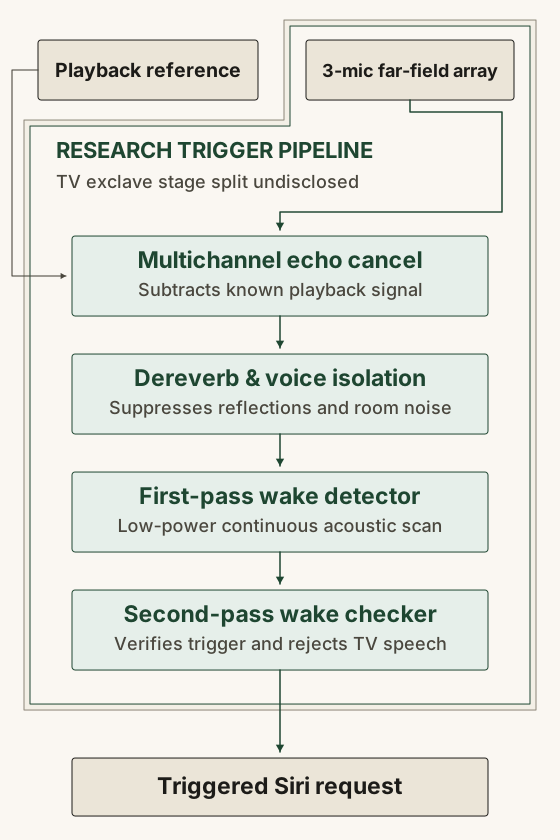
Those studies describe HomePod and general Siri voice-trigger research rather than disclosing the internal stage placement on the three-microphone Apple TV 4K, yet the engineering contrast applies directly to room apps. A wake detector only has to decide whether one person projected a short activation phrase toward the television. A meeting or visit transcriber must capture multiple people speaking at normal conversational volume across a table while preserving speaker turns, domain terms, numbers, and short negations such as "no" or "not". Front-end voice isolation that suppresses quieter off-axis voices can help a command recognizer while dropping side-table replies. An app architect therefore has to test long-form word error rate across the room rather than assuming Siri's wake range predicts transcription quality.
Secure Exclaves and XNU audio buffer arbitration
In the October 13 announcement, Apple states that the 4th-generation Apple TV 4K and the A19 chip include Secure Exclaves: protected and compartmentalized runtimes used to process microphone data separately from the rest of the system, with silicon isolation features keeping them segregated. Apple states: "Data that is processed and analyzed in the Secure Exclaves cannot be accessed by tvOS, apps, the user, or Apple." That statement covers microphone data processed and analyzed inside Secure Exclaves; the announcement does not map which specific Siri stages run inside those runtimes or whether the enclosure microphones also expose a separate capture route to third-party tvOS apps.
Secure Exclaves are compartmentalized runtimes on the system-on-chip, distinct from the Secure Enclave coprocessor. While Apple has not published the Apple TV 4K's internal exclave architecture, Darwin's open-source XNU kernel headers show how the operating system arbitrates shared audio memory with exclave environments. In osfmk/mach/exclaves.h at tag xnu-12377.121.6, kernel comments explain that an Exclave Indicator Controller (EIC) arbitrates access to audio shared buffers: "Audio buffers are distiguished from general shared buffers as access to the contents of the shared memory is arbitrated by the EIC." and "Audio buffers are arbitrated via the EIC and copies will return 0's when access to the sensor is not granted." In the same header, exclaves_sensor_start is documented to "Start accessing a sensor and cause any indicators to display.", while osfmk/kern/exclaves.c gates exclave calls behind private com.apple.private.exclaves.* entitlements.
FIGURE 2 · SYSTEM SIRI PATH VS. TVOS 27.2 APP PATH
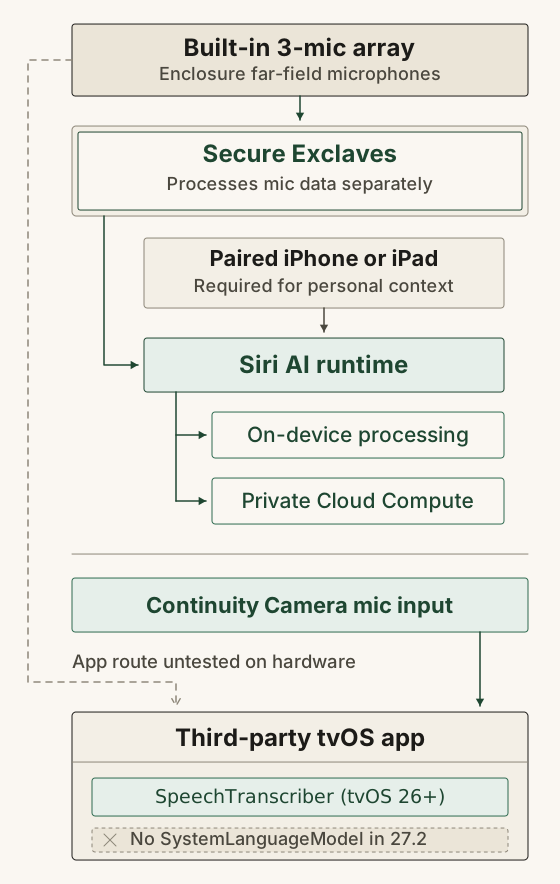
There is no public Secure Exclaves API in AppleTVOS27.2.sdk. The generic XNU code demonstrates how Darwin can let a compartmentalized runtime analyze sensor buffers while returning zeros to the kernel unless sensor access is granted and indicator state is updated. It does not disclose which specific stages of the Apple TV 4K's Siri pipeline execute inside Secure Exclaves, nor does it establish whether or how the new three-microphone array is routed to third-party apps on retail hardware.
Where Siri AI requests go after wake detection
Tracing a Siri request after wake detection clarifies what Apple's exclave statement covers and what happens next. Apple's guarantee that data inside Secure Exclaves cannot be accessed by tvOS, apps, the user, or Apple applies to data processed inside those compartmentalized runtimes. Once Siri is triggered, the request enters the Siri AI execution path.
In the announcement, Apple states: "Siri requests on Apple TV 4K can use on-device processing or Private Cloud Compute". Apple's Ask Siri, Dictation & Privacy notice notes that Private Cloud Compute can also analyze a request to decide whether it can be fulfilled on-device. When a request is processed in Private Cloud Compute (PCC), Apple's security documentation specifies that processing is stateless (request data is not retained after returning a response), administrators have no privileged access to user prompts, and devices cryptographically verify attested server software builds that researchers can inspect.
Apple's announcement footnotes also define the operational requirements for Siri AI in the living room. Siri AI launches in beta in tvOS 27.2 on Apple TV 4K (2nd generation or later) in English across the U.S., Australia, Canada, India, New Zealand, Singapore, South Africa, and the UK. It requires the home owner in the Apple Home app to have an Apple Intelligence-enabled iPhone or iPad running current software with Siri AI turned on and set to a supported language, and personal-context queries (such as "Play the show Alinda recommended.") require a paired Apple Intelligence device with Siri AI enabled. Apple does not specify which requests execute on the TV versus a paired device or Private Cloud Compute, and notes that server-side Apple Intelligence features carry daily usage limits with paid expanded access planned in the future. Separately, the tvOS privacy settings guide documents the opt-in "Improve Siri and Dictation" setting, which lets Apple store and review Siri and dictation audio to improve speech systems.
App Intents and the tvOS 27.2 assistant boundary
Because Siri AI is powered by Apple Intelligence, developers often ask whether a tvOS app can send a transcript to Siri AI for summarization. Architecturally, Apple Intelligence and Siri AI integration via App Intents works in the opposite direction: it exposes an app's actions and entities so the system assistant can invoke them, rather than giving the app a programmatic prompt interface to Siri's models.
On supported platforms, developers integrate with Siri AI by conforming AppIntent and AppEntity types to App schema domains, indexing entities in Spotlight, annotating onscreen content, supporting content sharing, and implementing flexible intent behavior. For custom voice phrases, App Shortcuts let an app provide up to 10 App Shortcuts, each containing one or more App Intents actions, through AppShortcutsProvider on iOS, iPadOS, visionOS, and watchOS; Apple's App Shortcuts Human Interface Guidelines state that App Shortcuts are not supported in macOS or tvOS (though macOS supports building custom shortcuts from an app's App Intents actions in the Shortcuts app).
In the installed AppleTVOS27.2.sdk, the App Intents surface on tvOS is similarly restricted. While the base AppIntent, AppEntity, AppShortcutsProvider, and AudioRecordingIntent protocols compile in the tvOS 27.2 AppIntents module interface, every AppSchema domain extension (such as .assistant and .audio) is marked @available(tvOS, unavailable), and AudioRecordingIntent on iOS relies on starting a Live Activity, which tvOS does not have. A room voice app on tvOS 27.2 therefore cannot invoke Siri AI as a text-generation backend or register tvOS App Shortcuts; if you want voice shortcuts to start or query a session, expose those intents on a companion iPhone app.
SpeechTranscriber and the dated Foundation Models split
Setting Siri aside, the app's own speech and language-model code depends on what compiles in AppleTVOS27.2.sdk and how that compares with Apple's current web documentation. The two frameworks sit in different states: modern speech transcription is available in the tvOS 27.2 SDK today, whereas Foundation Models differs between the installed 27.2 SDK and Apple's November 4, 2026 web documentation.
For on-device speech recognition, SpeechAnalyzer and SpeechTranscriber are marked @available(anyAppleOS 26, *) (excluding only watchOS), and CaptureInputSequenceProvider is marked @available(anyAppleOS 27, *). CaptureInputSequenceProvider.providerWithSession(from:compatibleWith:priority:) reads audio from an AVCaptureDevice and yields an AsyncSequence of AnalyzerInput frames for SpeechAnalyzer. At runtime, the app checks SpeechTranscriber.isAvailable and supportedLocales, ensures the locale's assets are installed, streams audio into SpeechAnalyzer, reads the asynchronous result sequence, and calls finalizeAndFinishThroughEndOfInput() when capture ends so buffered words flush before the session closes.
While the SpeechTranscriber documentation suggests DictationTranscriber as a fallback when isAvailable is false, DictationTranscriber (along with its .farField content hint) is marked @available(tvOS, unavailable) in the tvOS 27.2 Speech interface. A local typecheck probe (xcrun --sdk appletvos swiftc -typecheck -target arm64-apple-tvos27.2) calling SpeechTranscriber.isAvailable exits with code 0, confirming the SDK symbol is available while leaving physical hardware capability and asset download verification for November 13.
For language-model inference, the installed AppleTVOS27.2.sdk marks SystemLanguageModel, LanguageModelSession, and PrivateCloudComputeLanguageModel with @available(tvOS, unavailable). Running xcrun --sdk appletvos swiftc -typecheck -target arm64-apple-tvos27.2 on SystemLanguageModel.default exits with code 1 and the error 'SystemLanguageModel' is unavailable in tvOS. In Apple's live developer documentation fetched on November 4, 2026, the top-level Foundation Models page and PrivateCloudComputeLanguageModel still omit tvOS, while SystemLanguageModel lists tvOS 27.3 beta and LanguageModelSession lists tvOS 27.0. That documentation update points to a tvOS 27.3 beta surface, while the installed 27.2 SDK does not compile it and no tvOS 27.3 beta build or hardware runtime check is established yet. Before relying on the built-in model on Apple TV, compile against a matching tvOS 27.3 beta SDK and check SystemLanguageModel.Availability on physical hardware across your target region and language settings.
TABLE 2 · TVOS 27.2 SDK VS. WEB DOCUMENTATION
| Framework / Symbol | Installed AppleTVOS27.2.sdk | Live Apple Web Docs (Nov 4, 2026) | Architectural Role on Apple TV 4K |
|---|---|---|---|
| AVAudioSession / AVAudioEngine | Available (tvOS 9.0+) | tvOS 9.0+ | Configures .voiceChat mode and inputNode voice processing for connected inputs |
| AVContinuityDevice (Continuity Camera) | Available (tvOS 17.0+) | tvOS 17.0+ | Documented path to use an iPhone or iPad microphone and camera from a tvOS app |
| SpeechAnalyzer & SpeechTranscriber | Available (anyAppleOS 26, *); swiftc -typecheck passes | tvOS 26.0+ | Streams conversational speech-to-text on device; requires runtime isAvailable check |
| CaptureInputSequenceProvider | Available (anyAppleOS 27, *) | tvOS 27.0+ | Bridges an AVCaptureDevice into AnalyzerInput sequences for SpeechAnalyzer |
| DictationTranscriber (.farField) | @available(tvOS, unavailable) | Omits tvOS | Unavailable on tvOS; cannot be used as a fallback or far-field hint on Apple TV |
| SystemLanguageModel | @available(tvOS, unavailable); swiftc -typecheck fails | Lists tvOS 27.3 beta | Unavailable in 27.2 SDK; requires matching 27.3 beta SDK and hardware availability check |
| LanguageModelSession | @available(tvOS, unavailable) | Lists tvOS 27.0 | Unavailable in 27.2 SDK module interface despite 27.0 web documentation tag |
| PrivateCloudComputeLanguageModel | @available(tvOS, unavailable) | Omits tvOS (lists iOS, iPadOS, Mac Catalyst, macOS, visionOS, watchOS 27.0+) | Unavailable on tvOS; accessible from an eligible companion app on supported platforms |
| Core AI (AIModel / AIModelCache) | Available (tvOS 27.0) | tvOS 27.0+ | Runs custom .aimodel weights on TV; .persistent cache policy is unavailable on tvOS |
| AppIntents & AppSchema domains | Base AppIntent compiles; all AppSchema domains @available(tvOS, unavailable) | App Shortcuts HIG: Not supported in tvOS | No Siri App Shortcut invocation on tvOS; expose voice shortcuts on iPhone companion |
| DeviceDiscoveryUI & Network | Available (tvOS 16.0+) | tvOS 16.0+ | Pairs TV app with local iPhone/iPad/watchOS companion on same iCloud account or family |
Sizing custom local models on A19 and managing purgeable caches
When building against the tvOS 27.2 SDK without SystemLanguageModel, the first way to keep both transcription and summarization inside the Apple TV 4K is to run custom model weights on the A19 chip. Developers can load custom models through Apple's Core AI framework (introduced in tvOS 27.0 for .aimodel assets), Core ML, or open-source Apple silicon packages such as mlx-swift (v0.33.0) and mlx-swift-lm (v3.32.3), both of which include .tvOS(.v17) in Package.swift (with mlx-swift-lm also declaring a default FoundationModelsIntegration trait). Package platform declarations provide a build starting point; actual token generation speed and thermal behavior inside the 93.24 × 93.24 × 31.00 mm enclosure require physical hardware benchmarks.
Choosing which model sizes to benchmark first requires separating reported device RAM from an app's memory footprint. Even if the reported 8GB RAM figure in Xcode 27.2 is confirmed on retail hardware, total device RAM is not an app's allocation budget, and the com.apple.developer.kernel.increased-memory-limit entitlement is documented for iOS, iPadOS, and visionOS, not tvOS. Inside your app's process, custom model weights, the key-value (KV) context cache, and activation scratch buffers drive the app's resident and dirty memory footprint, while across the system that workload competes for device memory with active SpeechTranscriber sessions, tvOS system services, and 4K video compositing. Profiling resident and dirty memory on retail hardware while transcription and inference run concurrently shows the observed footprint and whether tvOS terminates that workload on the tested device and OS version.
Memory arithmetic from the primary Hugging Face config.json files for the Qwen3 family (0.6B, 1.7B, 4B, and 8B) shows why weight size and KV cache must be calculated separately. At a nominal 4 bits (0.5 bytes) per parameter, lower-bound weight memory scales linearly with total parameter count, before adding quantization scales and zeros, any non-quantized tensors, runtime overhead, and activation workspace. By contrast, an unquantized FP16 KV cache depends on layer count, attention head geometry, and token count rather than weight quantization: 2 (K and V) × num_hidden_layers × num_key_value_heads × head_dim × 2 bytes × tokens. Because all four Qwen3 models use 8 KV heads and a 128-element head dimension, each token in an FP16 cache occupies 4,096 bytes per layer.
TABLE 3 · QWEN3 4-BIT WEIGHT AND FP16 KV-CACHE ARITHMETIC
| Model (Primary config.json) | Architecture (Layers / KV Heads / Head Dim) | Nominal 4-Bit Weights (0.5 B/param) | FP16 KV Cache at 4,096 Tokens | FP16 KV Cache at 8,192 Tokens |
|---|---|---|---|---|
| Qwen3-0.6B | 28 layers / 8 KV heads / 128 dim | 0.30 GB | 448 MiB | 896 MiB |
| Qwen3-1.7B | 28 layers / 8 KV heads / 128 dim | 0.85 GB | 448 MiB | 896 MiB |
| Qwen3-4B | 36 layers / 8 KV heads / 128 dim | 2.00 GB | 576 MiB | 1,152 MiB |
| Qwen3-8B | 36 layers / 8 KV heads / 128 dim | 4.00 GB | 576 MiB | 1,152 MiB |
Without a physical Apple TV 4K benchmark, no model size is a proven fit or a proven failure, yet Table 3 establishes a clear test order. Starting hardware profiling with Qwen3-0.6B, Qwen3-1.7B, and Qwen3-4B at a bounded 4,096-token context window (summarizing rolling 10-minute transcript chunks of roughly 1,950 English tokens each) saves 448 to 576 MiB of KV cache compared with an 8,192-token window, before testing whether Qwen3-8B can coexist with SpeechTranscriber.
Delivering and caching those weights on tvOS carries its own lifecycle rules. App Store Connect's build size reference caps an uncompressed tvOS app bundle at 4GB and the total of all __TEXT sections in a Mach-O binary at 500MB, so multi-gigabyte models are typically fetched on demand or via Background Assets. When Core AI loads a portable .aimodel file, its specialization and caching guide explains that AIModel compiles executable code for the current hardware and OS version, and recommends setting expectFrequentReshapes = true on SpecializationOptions when a dynamic-shape model changes input shape on every token. Unlike iOS or macOS, Core AI's .persistent cache policy is unavailable on tvOS because local storage is limited and AIModelCache entries must remain purgeable by the system when disk space is low. An app can capture the specialized model's bookmarkData, store that bookmark in UserDefaults, and delete the source .aimodel file to save space, but if tvOS purges the cached specialization, an OS update invalidates it, or bookmark resolution returns nil or throws an error, the app must download and specialize the model again.
Relaying transcripts to an iPhone companion or HTTPS backend
When an app wants to avoid managing multi-gigabyte custom weights inside purgeable tvOS storage (or wants to use SystemLanguageModel and @Generable structured outputs while targeting tvOS 27.2), inference can move off the television across two remote paths: a local-network relay to a companion iPhone or iPad app, or an HTTPS request to a cloud backend.
For local-network pairing, DeviceDiscoveryUI and the Network framework connect a tvOS app to an iOS, iPadOS, or watchOS companion. Both targets declare a matching service name under NSApplicationServices in Info.plist. The companion app starts an NWListener at launch with init(applicationService:), while the tvOS app presents DevicePicker (or DDDevicePickerViewController) using NWBrowser.Descriptor.applicationService(name:options:) and opens an encrypted NWConnection to the selected NWEndpoint.
Running SpeechTranscriber on the Apple TV 4K before sending data over that connection changes the local network payload by three orders of magnitude. Mono 16 kHz, 16-bit PCM audio runs at 256,000 bits per second, or 1.92 MB per minute (115.2 MB per hour, decimal). An illustrative English speaking rate of 150 words per minute at 6 bytes per word (including spaces) produces 900 bytes per minute of text, or 54 KB per hour, a roughly 2,100× reduction in bandwidth. Streaming text also means the companion phone does not receive raw audio for later replay or re-transcription unless the app separately streams compressed audio or records on the phone. At about 1.3 tokens per word, 150 words per minute equals roughly 195 tokens per minute (11,700 tokens per hour), making a 10-minute segment about 1,950 tokens before prompt instructions and output.
FIGURE 3 · COMPANION RELAY AND CLOUD INFERENCE ROUTES
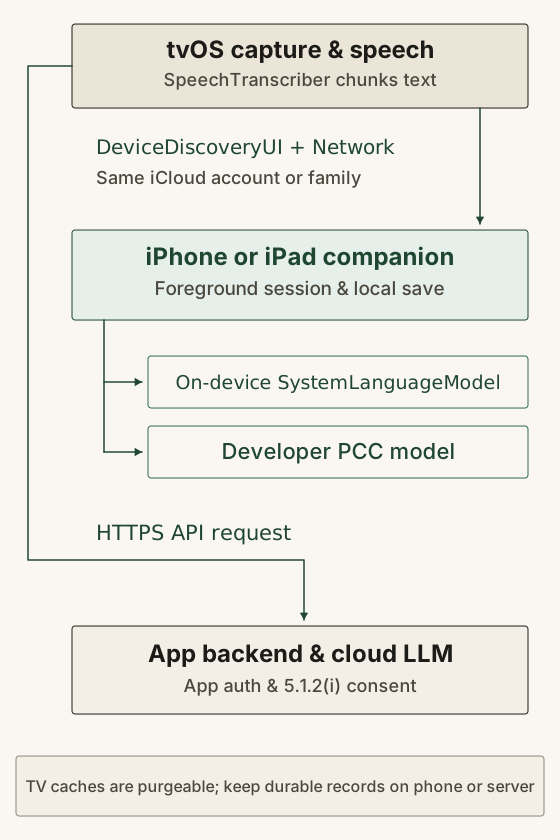
Three platform rules shape how a companion relay or cloud backend operates during a real session:
- **Account boundary on
DeviceDiscoveryUI:**DevicePickeronly lists local-network devices signed into the default Apple TV user's iCloud account or an account in the same iCloud family. That fits a home or a single-clinician office where one person owns the TV profile, and blocks ad-hoc pairing from unrelated corporate or guest Apple IDs. - Foreground companion lifecycle and durable-save acknowledgments: An iPhone app is not a permanent background server; locking the phone or switching apps can suspend the connection. A reliable relay treats a foreground companion session as the baseline, numbers each finalized transcript chunk with a
session_idand monotonicchunk_id, retains buffered chunks on the TV until the phone confirms they have been durably saved to disk, deduplicates chunks on reconnect, and marks any interrupted audio intervals. - Companion model and developer PCC eligibility: On an eligible Apple Intelligence iPhone or iPad, the companion app can run
SystemLanguageModellocally or callPrivateCloudComputeLanguageModel. Under Apple's Private Cloud Compute access policy, developer PCC access requires enrollment in the App Store Small Business Program, fewer than 2 million first-time App Store downloads from any of the developer's apps, and an assigned PCC entitlement; daily usage limits apply, and if any app subsequently exceeds 2 million first-time downloads or the developer leaves the Small Business Program, they have 6 months to migrate.
When a room deployment needs to support users across arbitrary accounts without DeviceDiscoveryUI's iCloud-family requirement, the tvOS app can send transcripts or audio over HTTPS to an authenticated backend service that holds provider credentials, calls a server-side model, and manages durable storage.
TABLE 4 · ROOM TRANSCRIPTION AND SUMMARIZATION ROUTES
| Design Route | Where Speech & LLM Run | Account & Pairing Constraint | Network Payload | Durable Storage Owner |
|---|---|---|---|---|
| Custom local model on Apple TV 4K (Core AI / Core ML / MLX) | SpeechTranscriber and custom local model both run on A19 TV | Single Apple TV for inference; handoff needed for personal review and archival | None during inference; model weights fetched on demand or via Background Assets | Personal device or backend after handoff; TV cache is purgeable |
| TV transcription + companion relay (On-device LLM) | SpeechTranscriber on A19 TV; SystemLanguageModel on foreground iPhone/iPad | DeviceDiscoveryUI requires same iCloud account or iCloud family as default TV user | ~900 bytes/min (54 KB/hr) text vs. 1.92 MB/min (115.2 MB/hr) raw 16 kHz mono PCM | Foreground iPhone/iPad companion app (sending durable-save acknowledgments to TV) |
| TV transcription + companion relay (Developer PCC) | SpeechTranscriber on A19 TV; PrivateCloudComputeLanguageModel via companion app | Same iCloud account/family for relay, plus Small Business Program (<2M first-time App Store downloads from any of the developer's apps) & PCC entitlement | ~900 bytes/min LAN text to companion, then encrypted PCC request (daily limits apply) | Foreground companion app after PCC response |
| TV capture/transcription + HTTPS cloud backend | SpeechTranscriber on A19 TV (or server ASR); LLM on cloud backend | Not bound to DeviceDiscoveryUI's iCloud-family rule; uses app-defined authentication and Guideline 5.1.2(i) consent | ~900 bytes/min (text) or 1.92 MB/min (PCM) over TLS to backend | Authenticated cloud backend with server-side retention controls |
How a shared television hub differs from a personal device
Apple's announcement positions the 4th-generation Apple TV 4K as a shared home hub alongside HomeView, HomePod mini 2, HomePod (2nd generation), and HomeKit Secure Video summaries, with Siri AI showing full-screen results or compact overlays and consulting a paired iPhone when a request needs personal context.
For an engineer designing a room voice application, running on a shared television appliance introduces three operating constraints:
- Account rules split between media capture and app networking: Because the Apple TV stays logged into a default user profile, system frameworks enforce different identity rules. Continuity Camera accepts an iPhone or iPad with a separate two-factor Apple ID as a microphone input, whereas
DeviceDiscoveryUIrestricts local app-to-app connections to the default TV user's iCloud account or iCloud family. - External playback paths vary by room: Whether the Apple TV sends audio over HDMI output to a television or receiver or wirelessly to paired HomePod speakers, the acoustic coupling between playback and microphone capture depends on the room's external hardware.
- The wall screen is visible to everyone in the room: Unlike a handheld phone screen, a television displays every recording indicator, live transcript line, and error banner to every participant in the meeting or visit.
Consent, durable save recovery, and shared-room retention
Regardless of how lower-level hardware capture is routed on the Apple TV 4K, app-owned audio buffers, SpeechTranscriber outputs, and network uploads do not automatically inherit Apple's privacy assurances for data processed inside Secure Exclaves or Private Cloud Compute. Once audio enters your app's sandbox, your code and Apple's App Store Review Guidelines govern consent, visibility, and retention.
Two App Store Review Guidelines apply directly to room voice apps. Under Section 2.5.14, apps that record user activity must obtain explicit user consent and provide a clear visual and/or audible indication during recording; on a wall display, that means showing an unmistakable active recording state that can be paused or stopped from the remote or companion device. Under Section 5.1.2(i), apps must disclose where personal data will be shared and obtain explicit permission before sending personal data to a third-party AI service. Running SpeechTranscriber locally on the A19 chip and uploading the resulting transcript text to an external cloud model still sends the conversation off the device and requires that disclosure and permission.
Local storage on a shared-room Apple TV calls for an explicit durability protocol. Core AI requires AIModelCache entries on tvOS to remain purgeable under low-space conditions, and Apple's archived Apple TV Programming Guide historically described local tvOS app storage as purgeable cache space alongside a 500KB UserDefaults limit. While modern frameworks manage their own asset lifecycles, keeping the authoritative record of a meeting or clinical visit on a personal companion device or authenticated backend is a sound design recommendation for a shared room. Temporary audio and transcript chunks buffered on the TV should be encrypted on disk, excluded from backups, and deleted only after the companion phone or backend acknowledges a durable save. If the TV app restarts after a crash or power outage, it should preserve unacknowledged chunks until the companion session reconnects to reconcile them or the session owner explicitly discards the unfinished session.
Applying the boundaries: from Basis on iPhone and iPad to room proposals
To see how capture, inference, review, and local storage fit together on iPhone and iPad, consider Basis, a free clinical scribe app from Basis Health. On its public support page and privacy policy, Basis is documented for supported Apple Intelligence iPhones and iPads running iOS 26 or iPadOS 26 or later with Apple Intelligence enabled and both device and Siri language set to English (US). On first use, the app requests microphone access and downloads Apple's speech model once so transcription works offline afterward.
During a visit, the clinician records audio on their iPhone or iPad, and Basis transcribes the conversation and drafts a note into a template on the device using Apple's built-in speech and language models. Before the note can be saved, the clinician checks each drafted section against the transcript in the "What was said" view and taps "Mark as reviewed". Only after every section is marked reviewed does "Save note" unlock, and "Copy note" places the saved text on the local clipboard for two minutes (while deleting a visit or letting the clipboard expire does not remove text already pasted into another app). According to its privacy policy, Basis requires no account, includes no analytics or advertising tracking, and sends no visit audio, transcripts, or notes to Basis or third-party AI services; recordings, transcripts, and saved note snapshots stay in local app storage excluded from device backups until the user deletes the visit (while iOS/iPadOS settings separately govern Apple model downloads and diagnostics, and typing two or more letters in the optional profile city field queries Apple Maps for suggestions).
Basis is documented for iPhone and iPad rather than tvOS. Adapting that kind of on-device visit or meeting scribe to a room equipped with a 4th-generation Apple TV 4K leads to three proposed architectures:
- Proposal A (Phone capture, inference, review, and storage with TV status display): The clinician's iPhone or iPad on the desk captures the audio, runs on-device transcription and note drafting, enforces the section-by-section "What was said" review, and holds the backup-excluded local record. The Apple TV 4K connects over
DeviceDiscoveryUI(requiring the phone and default TV profile to share an iCloud account or iCloud family) solely to display a clear room recording indicator on the wall screen and, when the clinician chooses to share it, a reviewed summary. The TV stores no visit audio or transcript chunks. - Proposal B (TV capture and transcription with foreground iPhone relay and storage): In this proposed split, the Apple TV 4K captures room audio (via a Continuity Camera iPhone placed near the people talking, or via the built-in three-microphone array if November 13 hardware tests confirm app access and acceptable far-field accuracy) and runs
SpeechTranscriberon A19 onceSpeechTranscriber.isAvailableand offline locale assets are confirmed. The TV streams chunk-numbered transcript text (~900 bytes per minute) over an encryptedDeviceDiscoveryUIandNetworklink to the clinician's foreground iPhone on the same iCloud account or family. The iPhone runsSystemLanguageModelto draft the note, hosts the human section review, saves the authoritative backup-excluded record on the phone, and sends durable-save acknowledgments so the TV can delete its own temporary buffered chunks. - Proposal C (TV capture, transcription, and custom local inference with external handoff): The Apple TV 4K runs
SpeechTranscriberand summarizes transcript chunks locally on A19 using a custom model via Core AI, Core ML, or MLX (orSystemLanguageModelif verified under a tvOS 27.3 beta SDK and retail hardware). Because a shared wall screen is public and tvOS caches can be reclaimed, the TV keeps the draft hidden behind a recording indicator during the session and transfers the transcript and draft overDeviceDiscoveryUIor an authenticated HTTPS backend to the clinician's personal device for section-by-section review and durable storage. Once the receiving device or server acknowledges the durable save, the TV deletes its own local temporary files.
Eight hardware and SDK tests for the November 13 release
Once the 4th-generation Apple TV 4K arrives in stores on November 13, 2026, eight checks on retail hardware (plus a matching tvOS 27.3 beta SDK specifically for the SystemLanguageModel check) will inform platform feasibility and which of those three architectures to select:
- **Inspect
AVAudioSessionandAVCaptureDeviceinputs on retail hardware:** CheckAVAudioSession.sharedInstance().availableInputsandAVCaptureDevice.DiscoverySessionon a 4th-generation Apple TV 4K running tvOS 27.2 to see whether the built-in three-microphone array or 4th-generation Siri Remote microphone is exposed to third-party apps. - **Check
SpeechTranscriberruntime availability and offline assets:** Verify thatSpeechTranscriber.isAvailablereturnstrueon A19 tvOS, inspectsupportedLocales, measure initial speech asset download behavior, and confirm offline transcription throughSpeechAnalyzer. - Measure far-field word error rate across room distances and playback: Play a multi-speaker test corpus from 1 meter, 3 meters, and 5 meters in quiet conditions and while the Apple TV sends audio over HDMI output and paired HomePod speakers, comparing word error rate, speaker turns, and negations between the TV microphone path (if exposed) and a table-top Continuity Camera iPhone.
- **Test
SystemLanguageModelwith a matching tvOS 27.3 beta SDK:** Compile a probe callingSystemLanguageModel.defaultandLanguageModelSessionagainst a tvOS 27.3 beta SDK, run it on the A19 Apple TV 4K, and inspectSystemLanguageModel.Availabilityacross regions, languages, and paired-device states. - Profile resident memory and process limits across Qwen3 candidates: Load 4-bit quantized
Qwen3-0.6B,1.7B,4B, and8Bmodels via Core AI andmlx-swift-lmalongside an activeSpeechTranscribersession, driving context to 4,096 and 8,192 tokens in Instruments to record peak dirty memory and find the per-process termination limit. - Benchmark sustained token throughput and thermals over 60 minutes: Run continuous rolling 10-minute chunk summarizations for an hour on the 93.24 × 93.24 × 31.00 mm hardware to measure prefill latency, decode tokens per second, and any thermal throttling.
- Test Core AI cache eviction and bookmark recovery: Specialize a
.aimodelon tvOS, save itsbookmarkDatainUserDefaults, delete the source.aimodelfile, and trigger storage pressure or specialization invalidation to verify that the app handles anilor throwing bookmark resolution by re-downloading and re-specializing the model. - **Verify
DeviceDiscoveryUIinterruption and durable-save recovery:** Stream numbered transcript chunks from the Apple TV 4K to an iPhone companion while locking the phone, switching apps, toggling Wi-Fi, and force-restarting the TV app to confirm that unacknowledged chunks stay buffered on disk, reconcile without duplicates on reconnect, and delete only after durable-save acknowledgment.
Until those measurements run on retail hardware, the architecture branches on two empirical questions. First, microphone input enumeration, on-device transcriber readiness, and multi-speaker word error rate across the room will show whether the set-top box can capture and transcribe a conversation from under the display or still needs a microphone on the table. Second, tvOS 27.3 beta system-model availability alongside sustained custom-model memory and thermal profiling will show whether note generation belongs on the A19 chip or on a paired companion device or server.