
Choosing and implementing Apple's Foundation Models in OS 27
LanguageModelSession unifies on-device Apple Intelligence, Private Cloud Compute, and custom Core AI or MLX weights behind one Swift API, while context limits, memory residency, and App Store rules still differ by route.



This post is AI augmented.
I used LLMs for research and some writing help, since English isn’t my first language. Still, I personally guide and edit the writing because I don’t want to publish AI slop.
This blog is for my own understanding and to look back on later. It’s a place to write down my projects and research related to things I’m working on.
When you add a language feature to a Swift app in OS 27, your first architectural decision is choosing who owns and runs the model weights. Because LanguageModelSession accepts any type conforming to the LanguageModel protocol, you can pass Apple's built-in on-device model (SystemLanguageModel), Apple's server-side model on Private Cloud Compute (PrivateCloudComputeLanguageModel), or a custom model you supply through CoreAI, MLX, or a remote server client, and reuse your prompt, @Generable output schema, and Tool definitions across the routes that support those capabilities.
Changing the model passed to LanguageModelSession(model:tools:instructions:) takes one line of code, yet the runtime contract underneath changes completely. Take a field-inspection app that turns a technician's site notes and attached photos into a structured maintenance report. Running that extraction on SystemLanguageModel.default uses weights already managed by the operating system on eligible Apple silicon. Your app binary ships without model files, and on-device inference runs offline (apart from any network calls your own tools make) with no developer API fee or foreground request cap, provided the system model is available for the user's device and locale, supports the capabilities and output quality the task requires, and can fit the instructions, prompt, image attachment, tool definitions and outputs, and generated report inside its on-device context window.
If the technician asks that same app to cross-reference a multi-document equipment manual and reason through conflicting repair steps, the prompt and intermediate reasoning tokens can outgrow the on-device context budget. Switching the session to PrivateCloudComputeLanguageModel expands the context window to 32,768 tokens and enables configurable reasoning effort without introducing API keys or developer cloud charges, while requiring an active network connection, developer enrollment in the App Store Small Business Program, and UI handling for per-user daily request quotas.
If your feature instead requires weights fine-tuned on proprietary repair codes, or must run on hardware where Apple Intelligence is unavailable, passing a CoreAILanguageModel or MLXLanguageModel keeps the LanguageModelSession call site while shifting asset delivery, compilation caching, and process memory management onto your app. This primer examines how each route works in OS 27 and the checks required to ship a reliable implementation.
Three model routes behind LanguageModelSession
In June 2026, Apple Machine Learning Research introduced the third generation of Apple Foundation Models (AFM 3), a family of five models custom-built in collaboration with Google and compressed with Quantization Aware Training for their target hardware. Apple's research overview notes the Google collaboration directly without specifying a distillation recipe from Google's commercial models, and calling FoundationModels in Swift is separate from using Google's public Gemini API.
The five AFM 3 models divide work between local Apple silicon and Private Cloud Compute (PCC) servers:
- AFM 3 Core (on-device): A 3-billion-parameter dense model optimized for Apple silicon.
- AFM 3 Core Advanced (on-device): A 20-billion-parameter sparse, natively multimodal model optimized for higher-tier Apple silicon that activates 1 to 4 billion parameters per request using Instruction-Following Pruning (IFP).
- AFM 3 Cloud (Private Cloud Compute): A server-side Parallel-Track Mixture-of-Experts (PT-MoE) model documented in Apple's AFM 3 Cloud Model Documentation Form (v1.1, updated September 23, 2026) at 500 billion to 1 trillion total parameters with a 32K token context window, running on Apple silicon or NVIDIA B200 hardware.
- ADM 3 Cloud (Image, Private Cloud Compute): A server-side image generation and editing model optimized for Apple silicon that powers Image Playground, Genmoji, and specialized adapters such as Spatial Reframing in Photos.
- AFM 3 Cloud Pro (Private Cloud Compute): Apple's most capable server-based model for demanding agentic tool use and complex reasoning, for which Apple worked with Google and NVIDIA to extend Private Cloud Compute privacy guarantees to NVIDIA GPUs in Google Cloud.
ARCHITECTURE
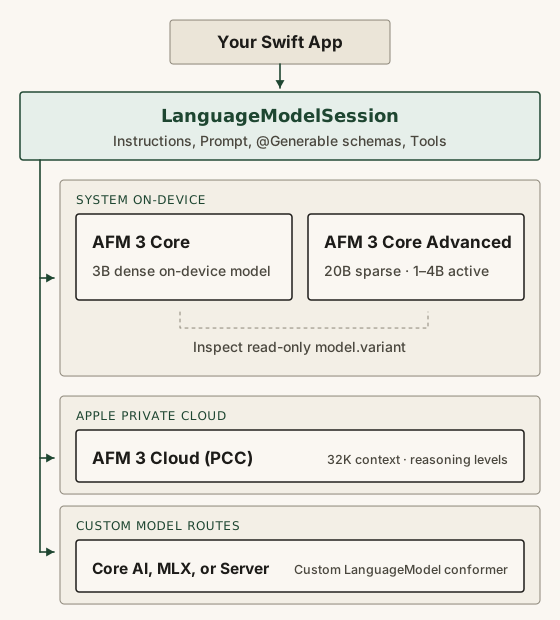
Third-party Swift code accesses specific members of this lineup through FoundationModels. On device, SystemLanguageModel.default (or SystemLanguageModel(useCase: .contentTagging)) targets the local system model, which OS 27 backs with either .core3 (AFM 3 Core) or .coreAdvanced3 (AFM 3 Core Advanced). On the server, PrivateCloudComputeLanguageModel() routes requests from entitled apps to AFM 3 Cloud; Apple's developer documentation maps the PCC API to AFM 3 Cloud rather than exposing a separate selector for AFM 3 Cloud Pro.
For weights outside Apple's managed models, OS 27 introduces the LanguageModel protocol and LanguageModelExecutor. Alongside announcing plans at WWDC26 Session 241 to open-source the core FoundationModels framework, Apple published open-source packages that conform to LanguageModel: coreai-models (CoreAILanguageModel) for running exported .aimodel bundles on iOS and macOS, mlx-swift-lm (MLXLanguageModel) for running quantized open-weight models on Apple silicon, and foundation-models-utilities (supporting Apple platforms and select Linux distributions such as Ubuntu), which includes ChatCompletionsLanguageModel for servers implementing the chat completions REST API. External providers including Anthropic and Google also publish Swift packages conforming to LanguageModel.
Sharing the LanguageModelSession call site does not mean every model supports the same features or operating terms. Each LanguageModel conformer declares its capabilities (such as .guidedGeneration, .toolCalling, .vision, or .reasoning), and calling an unsupported feature throws LanguageModelError.unsupportedCapability(_:). Network and privacy boundaries also follow the actual data flow: an on-device model runs inference locally, though any app-defined Tool it calls can still make network requests, and sending personal data to a third-party AI service requires clear disclosure and explicit user permission under App Store Review Guideline 5.1.2(i).
MODEL ROUTING COMPARISON
| Dimension | System On-Device | Private Cloud (PCC) | Local Custom | Remote Custom |
|---|---|---|---|---|
| Model weights | AFM 3 Core or Core Advanced | AFM 3 Cloud (500B–1T PT-MoE) | Core AI (.aimodel) or MLX weights | External or self-hosted server |
| Weight storage | OS-managed in system flash | Apple PCC server nodes | App bundle or Background Assets | Remote provider infrastructure |
| Context window | 4,096 or 8,192 tokens (inspect) | 32,768 tokens (incl. reasoning) | Fixed (iOS Core AI) or dynamic | Defined by server model |
| Network & offline use | Offline inference (tools may vary) | Requires network connection | Offline after asset download | Requires network connection |
| Quotas & eligibility | No foreground cap; bg rate-limited | <2M downloads; daily user quota | Bound by device RAM & storage | Provider billing & rate limits |
| Reasoning & fine-tuning | No reasoning; .fmadapter obsoleted | Light, moderate, or deep reasoning | Custom weights; LoRA or full tune | Depends on server & capabilities |
On-device hardware tiers and flash-resident experts
Scaling an on-device system model to 20 billion parameters (AFM 3 Core Advanced) runs into the memory-residency bottleneck of conventional local model architectures. Traditional dense and Mixture-of-Experts (MoE) models keep all model weights resident in active DRAM: even when a standard MoE model activates only a fraction of its parameters per token, selecting different experts on every generated token happens too quickly to page weights from storage on the fly. Requiring the entire parameter set to stay in DRAM creates a large active-memory footprint that competes with the operating system and running apps on consumer hardware.
Apple's AFM 3 architecture avoids holding all 20 billion parameters in RAM through Instruction-Following Pruning (IFP). The operating system stores the full AFM 3 Core Advanced model in NAND flash. When a session processes a prompt, a lightweight dense block makes routing decisions per prompt rather than per token, selecting a small fixed set of feed-forward routed experts from flash and combining them in DRAM with always-active shared experts. During token generation, the model periodically reselects and updates those activated experts in DRAM, keeping 1 to 4 billion parameters active depending on the difficulty of the request.
In OS 27, your app can inspect which on-device model backs SystemLanguageModel through the read-only .variant property, final var variant: SystemLanguageModel.Variant { get }, which exposes .core3 and .coreAdvanced3 alongside a displayName string. Because .variant has no setter or initializer parameter, an app cannot request .coreAdvanced3 on a baseline device or force .core3 on an advanced device; the operating system assigns the variant for the current hardware.
Apple's published footnotes establish which devices qualify for baseline Apple Intelligence and which qualify for the advanced on-device model tier. Per Apple Support 121115, the Apple Intelligence hardware page, and the June 2026 Siri AI announcement, the advanced on-device model and its expressive-voice and dictation features are supported on iPhone 18 Pro, iPhone 18 Pro Max, iPhone Duo, iPhone 17 Pro, iPhone 17 Pro Max, iPhone Air, iPad models with M4 and later and at least 12 GB of unified memory, Mac models with M3 and later and at least 12 GB of unified memory (including M5 Pro MacBook Pro), and Apple Vision Pro (M5). Other Apple Intelligence devices, including iPhone 15 Pro and Pro Max (A17 Pro), the iPhone 16 series, baseline iPhone 17 and 17e models, iPad mini (A17 Pro), M1 through M3 iPad Air and iPad Pro models, M4 iPads under 12 GB, MacBook Neo (A18 Pro), M1 and M2 Macs, M3+ Macs under 12 GB, and Apple Vision Pro (M2), fall into the baseline Apple Intelligence tier. Paired Apple Watch Series 9+, Ultra 2+, and SE 3 models support watchOS Apple Intelligence features when paired with an eligible iPhone, though SystemLanguageModel does not run locally on watchOS.
Keep two distinctions in mind when reading Apple's hardware requirements. First, the up to 14 GB storage requirement for the advanced tier and up to 8 GB for other eligible iPhones, iPads, Macs, and Vision Pro models (plus up to 1.5 GB on Apple Watch) in Apple Support 121115 represent total Apple Intelligence system flash storage, which may temporarily increase during OS updates while new models download and older ones are removed, rather than the runtime RAM footprint of a single model. Second, Apple's footnotes publish hardware eligibility for the advanced model tier rather than a device-identifier lookup table for Swift code. Instead of branching on device names or unified memory totals, inspect model.availability, model.variant, and model.contextSize at runtime on your test hardware.
HARDWARE & STORAGE TIERS
| Hardware Tier | Eligible Devices | On-Device Model Tier | OS Storage Required |
|---|---|---|---|
| Advanced iPhone tier | iPhone 17 Pro/Max, Air, 18 Pro/Max, Duo | Eligible for Core Advanced | Up to 14 GB on device |
| Baseline iPhone tier | iPhone 15 Pro/Max, 16 series, 17/17e | Baseline on-device tier (Core) | Up to 8 GB on device |
| Advanced iPad tier | iPad with M4+ and >=12 GB memory | Eligible for Core Advanced | Up to 14 GB on device |
| Baseline iPad tier | iPad mini (A17 Pro), M1–M3, M4 <12 GB | Baseline on-device tier (Core) | Up to 8 GB on device |
| Advanced Mac tier | Mac with M3+ and >=12 GB memory | Eligible for Core Advanced | Up to 14 GB on device |
| Baseline Mac tier | MacBook Neo (A18 Pro), M1/M2, M3 <12 GB | Baseline on-device tier (Core) | Up to 8 GB on device |
| Apple Vision Pro | Vision Pro (M5 advanced; M2 baseline) | Core Advanced (M5) or Core (M2) | Up to 14 GB (M5) or 8 GB (M2) |
| Apple Watch (paired) | Series 9+, Ultra 2+, SE 3 (with iPhone) | No local SystemLanguageModel | Up to 1.5 GB on watch |
Building a session with typed outputs and tools
An on-device Foundation Models integration starts by checking SystemLanguageModel.default.availability before showing feature UI or creating a session. Even on eligible silicon, the on-device model can be unavailable if the user has not turned on Apple Intelligence, if the device language or region is unsupported, or if model assets are still downloading (for example, changing the Siri language temporarily makes Apple Intelligence unavailable until the new language assets finish downloading and match the device language).
AVAILABILITY CHECK
If your app wants to guide users to Settings when Apple Intelligence is turned off, match .unavailable(.appleIntelligenceNotEnabled) explicitly before the catch-all .unavailable(let other) branch in GenerativeView.swift.
Once the model is available, create a LanguageModelSession. Use a new session instance for each standalone single-turn task so earlier turns do not consume context, or reuse one session across a multi-turn interaction so its transcript retains history. A session processes one request at a time: calling respond(to:options:) or streamResponse(to:options:) while session.isResponding is true throws LanguageModelSession.Error.concurrentRequests in OS 27. When the interface gives at least a 1-second lead time before a request, such as when a user focuses a text field, calling session.prewarm(promptPrefix:) asks the system to load session resources into memory and prefill a known prompt prefix early, though immediate loading is not guaranteed when the app is in the background or the system is under load.
Separate developer-authored Instructions from user-supplied Prompt text when configuring a session. Because the model obeys Instructions at a higher priority than Prompt inputs across every turn, Apple's safety guide warns against placing untrusted user input or external content inside Instructions, where it can act as a prompt injection vector. Keep user-supplied strings inside the Prompt and use Instructions for trusted role definitions, task rules, and formatting guidelines.
GUIDED GENERATION
When a feature populates UI views or app state, attaching @Generable to a Swift struct, actor, or enum (including nested @Generable types and enums with associated values) compiles a schema that drives constrained sampling. In CatProfile.swift, the schema and @Guide annotations perform two different jobs. Structural rules, specifically the Swift property types (String, Int), the declaration order of name, age, and profile (which the model always generates sequentially in the exact order declared), and programmatic bounds such as .range(0...20) on age, restrict which tokens the sampler can emit. By contrast, a natural-language description in @Guide, such as "A one sentence profile about the cat's personality" on profile, steers the model's wording inside that String property without verifying factual truth.
Constrained sampling prevents malformed syntax and removes manual string parsing, while calls can still throw LanguageModelError (such as .contextSizeExceeded, .refusal, or .unsupportedGenerationGuide) or GeneratedContent.ParsingError. When the allowed schema values are only known at runtime, such as restricting a field with anyOf to categories fetched from a user's database, build a DynamicGenerationSchema and GenerationSchema at runtime and decode properties from the returned GeneratedContent using value(_:forProperty:). For progressive UI updates, session.streamResponse(to:generating:) yields ResponseStream.Snapshot updates containing typed Content.PartiallyGenerated snapshots alongside rawContent, so SwiftUI views bind to partially populated structs rather than concatenating token deltas.
TOOL PROTOCOL
When the model needs live data from your app or needs to perform an action, pass an array of Tool conformers to LanguageModelSession. Each Tool defines a name, a concise description, a @Generable Arguments type (ConvertibleFromGeneratedContent), and an async call(arguments:) method returning a PromptRepresentable output. In a shipping version of FindContacts.swift, your call(arguments:) implementation supplies the Contacts authorization check and CNContactStore query where Apple's doc snippet leaves a placeholder comment. Because Tool conforms to Sendable, the session can run independent tool calls concurrently and execute dependent calls back-to-back.
In OS 27, GenerationOptions.ToolCallingMode lets you override the default .allowed mode with .disallowed (when the session transcript already holds the retrieved records) or .required (forcing a tool call before answering). If you set .required, you must define an exit condition, either by throwing an error from call(arguments:) or by using a LanguageModelSession.DynamicProfile with @SessionPropertyEntry and @SessionProperty to switch the mode back to .allowed after the first call; otherwise the session calls the tool in an infinite loop.
OS 27 also adds image attachments and built-in system tools. Prompts can include Attachment values created from CGImage, CIImage, CVPixelBuffer, UIImage, NSImage, or image URLs (with optional .orientation transforms and .label(_:) identifiers), and custom tools can take an ImageReference argument to resolve an image from the session Transcript (multimodal prompting guide). On physical devices, the Vision framework provides OCRTool and BarcodeReaderTool (neither runs in Simulator), while CoreSpotlight provides SpotlightSearchTool. Note a documented OS 27 issue (iOS & iPadOS 27 Release Notes, issue 183770678): SpotlightSearchTool() defaults to a .complete schema sized for Private Cloud Compute, which overflows the on-device SystemLanguageModel context window before any prompt is added. For on-device sessions, configure a compact focused guide such as SpotlightSearchTool.Configuration(sources: [.coreSpotlight], guide: .focused()) or scope it to a domain like .focused(.documents).
Context budgets and OS 27 migrations
Every item in a session contributes tokens to the context window: Instructions, all Prompt turns, image attachments (where larger images consume more tokens and prefill time), @Generable schemas and @Guide descriptions, Tool definitions and outputs, and generated responses (Managing the context window).
Treat the on-device context limit as a runtime property rather than a hardcoded constant. On OS 26, SystemLanguageModel.contextSize returns 4096. For OS 27, Apple's written guide still refers to a 4,096-token on-device window, whereas code in WWDC26 Session 241 and WWDC26 Session 319 shows 8192 on newer OS 27 hardware. Character counts are only rough approximations of token usage (English and Spanish average three to four characters per token, Chinese, Japanese, Korean, and Vietnamese average about one token per character, and symbol-heavy strings such as +1-(408)-555-0123 can exceed ten tokens), so query model.contextSize and measure inputs with try await model.tokenCount(for:) (back-deployed to OS 26.4).
- Keep schemas and tool lists compact: Test
@Generabletypes without@Guidedescriptions first and add descriptions only when property names are ambiguous. Pass at most three to five tools per request, and setincludeSchemaInPrompt: falseon repeated structured calls in the same session to avoid resending hundreds of schema tokens (Instruments profiling guide). - **Handle
contextSizeExceededand transcript rollback:** When a session overflows and throwsLanguageModelError.contextSizeExceeded(_:), remove older entries fromsession.transcript, split tool argument generation and output synthesis into separate sessions, or apply thefoundation-models-utilitiesDynamicProfilemodifiers (.droppingCompletedToolCalls(),.rollingWindow(entries:),.summarizeHistory(...)) andSkills(initializing aSkillwithprompt:rather thaninstructions:inserts the skill as a tool output so it does not invalidate the key-value prefix cache). When a tool throws an error (LanguageModelSession.ToolCallError), the framework by default rolls backsession.transcriptto a previously known valid state before the last request (.revertTranscript); you can overridetranscriptErrorHandlingPolicywith.preserveTranscriptto keep the history from a failed or cancelled turn, though the last transcript entry may be partially generated and neither policy undoes external side effects a tool already executed. - **Guardrails for strings versus
@Generabletypes:** InitializingSystemLanguageModel(guardrails: .permissiveContentTransformations)skips framework guardrail checks (LanguageModelError.guardrailViolation(_:)) when processing inputs that may contain profanity or sensitive study notes, **only when generating a rawString**. Guided generation (@Generable) always runs the default input and output guardrails, and even in permissive string mode the model's built-in safety training can still return a refusal message. - Locale checks and background rate limits: Verify language support with
model.supportedLanguagesandmodel.supportsLocale(_:)(locale guide). For locales other thanen_US, startInstructionswith the exact English phrase"The person's locale is \(locale.identifier)."and state the required output language explicitly when prompt templates and user inputs mix languages. On device, foreground requests have no quota, while background requests can throwLanguageModelError.rateLimited(_:). Although OS 27 adds the Background Inference entitlement (com.apple.developer.background-tasks.continued-processing.inferencewithBGContinuedProcessingTask) to keep Core AI, Core ML, and MPSGraph work on the Neural Engine in the background, Apple's documentation does not state that it applies toSystemLanguageModel.
Migrating an OS 26 codebase to OS 27 also requires updating error handling, option initializers, and deprecated model customization paths (Foundation Models updates):
- **Layered error types (
LanguageModelError):** OS 27 deprecatesLanguageModelSession.GenerationErrorand separates model failures (LanguageModelError), session concurrency and transcript mutation errors (LanguageModelSession.Error.concurrentRequestsand.transcriptMutationWhileResponding), on-device asset errors (SystemLanguageModel.Error), and decoding failures (GeneratedContent.ParsingError). Apps supporting both OS 26 and OS 27 branch with#available(iOS 27.0, macOS 27.0, visionOS 27.0, *)as shown inErrorHandling.swift. - **
GenerationOptionssamplingModeand model defaults:**GenerationOptionsrenames the deprecatedinit(sampling:temperature:maximumResponseTokens:)initializer parameter tosamplingMode:(back-deployed before OS 27). UsemaximumResponseTokensonly to guard against runaway verbosity, because strict caps can truncate or malform output, and re-test prompts across OS releases (26.0–26.3,26.4, and27.0) becauseniloption properties defer to model defaults that can change between model versions. - **Obsoleted
SystemLanguageModel.Adapter:** Custom.fmadapterLoRA weights were deprecated in OS 26.4 and are obsoleted in OS 27.0. Apple's adapter training guide states that toolkit26.0.0is the final release and is incompatible with OS 27 and later. Features that depended on.fmadapterspecialization must move to prompt or skill engineering, Private Cloud Compute, or custom weights in Core AI or MLX. - **Discontinued
ImageCreatorAPI and profiling tools:** According to Apple's June 11, 2026 developer notice,ImageCreatoris discontinued in OS 27, causing runtime errors in TestFlight on betas and failing to compile on public OS 27 releases (even though the installed Xcode 27.2 SDK headers still mark the symbol deprecated rather than obsoleted). Apple directs developers to present the interactiveImagePlaygroundsystem UI sheet or view controller rather than offering a drop-in programmatic image-generation class. When validating OS 27 prompt changes, inspect latency, prefix cache hits, and token counts in Xcode's Foundation Models Instrument (noting that trace files store prompts and responses unencrypted), the macOS 26+ Pythonapple-fm-sdk, or the macOS 27fmCLI.
OS 27 ERROR MIGRATION
When a feature needs Private Cloud Compute
When evaluation with the Evaluations framework shows that a task needs a larger context window for long documents or multi-step reasoning across competing constraints, OS 27 lets you initialize LanguageModelSession with PrivateCloudComputeLanguageModel() (server-side intelligence guide). Passing PrivateCloudComputeLanguageModel() preserves your existing Instructions, @Generable types, and Tool conformers while routing requests over Private Cloud Compute to AFM 3 Cloud, and in watchOS 27 it enables LanguageModelSession on Apple Watch where SystemLanguageModel is unavailable locally.
Per Apple's AFM 3 Cloud Model Documentation Form, AFM 3 Cloud is a 500B–1T parameter PT-MoE model with a 32,768-token (32K) maximum context window. While the model form lists text, images, and video up to 32K tokens as model-level input modalities and text as the output modality, the FoundationModels SDK documents text and image Attachment inputs and does not expose a public video attachment API. Note the SDK signature difference in Xcode 27.2: whereas SystemLanguageModel.contextSize is a synchronous Int property, PrivateCloudComputeLanguageModel.contextSize is get async throws, requiring try await model.contextSize.
Unlike the on-device system model, PrivateCloudComputeLanguageModel supports configurable extended reasoning through ContextOptions(reasoningLevel:), with .light, .moderate, and .deep levels. Apple recommends starting evaluation at .moderate and reserving .deep for tasks with competing architectural or scheduling constraints. Intermediate reasoning text is stored in the transcript as Transcript.Entry.reasoning(_:) rather than user-facing response text, and those reasoning tokens count toward the 32,768-token context window while increasing response latency.
- Small Business Program eligibility and the 6-month migration window: PCC requires no API keys, user login screens, or developer cloud fees, provided your team holds the managed
com.apple.developer.private-cloud-computeentitlement. Under Accessing Private Cloud Compute, developers must be enrolled in the App Store Small Business Program, "Have fewer than 2 million first-time app downloads from any of their apps on the App Store" (TestFlight and ad hoc installs are excluded), and have the PCC entitlement assigned to their account. If any app later crosses 2 million first-time downloads or the developer leaves the Small Business Program, Apple notifies the developer and provides 6 months to migrate to another route. - Per-user daily quotas and iCloud+ upgrades: End users receive a daily PCC allowance that varies with request complexity, feature usage, and system demand, with higher daily limits for iCloud+ subscribers. Check
model.quotaUsage.isLimitReachedandmodel.quotaUsage.status(.belowLimit(let info)whereinfo.isApproachingLimitflags approaching exhaustion) to show quota state in your UI, readmodel.quotaUsage.resetDatewhen populated, and wire a button tomodel.quotaUsage.limitIncreaseSuggestion?.show()so users who hitPrivateCloudComputeLanguageModel.Error.quotaLimitReached(_:)can view the system iCloud+ upgrade sheet. You can simulate approaching and reaching the quota in Xcode under Product > Scheme > Edit Scheme > Run > Options > Simulated Apple Foundation Models Availability. - Task-dependent fallback design: The framework never escalates
SystemLanguageModelcalls to PCC automatically, nor doesPrivateCloudComputeLanguageModelautomatically fall back when the device is offline, whenmodel.availabilityis.unavailable(.systemNotReady), or when a user hits.quotaLimitReached. Match your fallback path to what the task actually requires: if a condensed request can still succeed onSystemLanguageModel(including on OS 26, where PCC is unavailable), retry on device. If the task requires PCC's 32K context window or extended reasoning so that a truncated on-device prompt would fail or produce poor results, do not silently degrade the output, and remember that routing personal data to a third-party server requires separate disclosure and explicit user permission under Guideline 5.1.2(i). In those cases, preserve the user's request and surface the offline or quota-reset state directly.
Running custom weights with Core AI and MLX
When your app exceeds the 2 million first-time download ceiling for PCC, needs custom fine-tuned weights in OS 27, must run on devices without Apple Intelligence, or targets a specific open-weight or server model, you can pass your own LanguageModel conformer into LanguageModelSession.
Introduced in OS 27 across iOS, iPadOS, macOS, visionOS, watchOS, and tvOS, the Core AI framework executes neural networks across the CPU, GPU, and Apple Neural Engine using .aimodel bundles exported from PyTorch with coreai-torch and compressed with coreai-opt (Core ML remains supported alongside Core AI for decision trees, tabular models, and earlier OS targets). To run an exported language model inside LanguageModelSession, Apple's open-source coreai-models repository provides the CoreAILM Swift package product (CoreAILanguageModels module) and CoreAILanguageModel(resourcesAt:) (Core AI session guide). Keep the framework and package platform boundaries distinct: while CoreAI.framework ships across all OS 27 platforms, coreai-models/Package.swift declares only .macOS("27.0") and .iOS("27.0") for the CoreAILM package.
- **Platform-specific exports (
uv run coreai.llm.export):** Core AI export recipes specialize models by platform: iOS exports configure a fixed context window at export time, whereas macOS exports use a dynamic key-value cache. On dynamic-shape models whose sequence grows token by token, settingSpecializationOptions.expectFrequentReshapes = trueskips costly per-shape recompilation. - **Ahead-of-time compilation (
.aimodelc) and caching:** Loading a portable.aimodelfile triggers on-device specialization intoAIModelCache.default(specialization and caching guide). To reduce first-launch specialization time on Apple Intelligence hardware (A17 Pro+ iPhone/iPad,M1+ Mac, andM2+ Vision Pro, excluding watchOS and tvOS),xcrun coreai-build compilepre-compiles.aimodelinto per-architectureMyModel.<arch>.aimodelcbundles that your app matches at runtime usingAIModel.deviceArchitectureName(AOT compilation guide). - Persistent cache bookmarks after source deletion: After specializing with
cachePolicy: .persistent(unavailable on tvOS, where cache entries must stay purgeable), an app can storemodel.bookmarkData, delete the source.aimodelfile to reclaim disk space, and reload the cached specialization on later launches viaAIModel(resolvingBookmark:). Because storage pressure or an OS update can still purge or invalidate the cache, keep a recovery path to download and specialize the model again when bookmark resolution fails.
Alongside Core AI, MLX Swift LM runs language and vision-language models across the CPU and GPU in unified memory (separate from the Apple Neural Engine), supporting 4-bit quantization as well as LoRA and full fine-tuning. On M5 Macs running macOS 26.2 or later, MLX uses Metal 4 TensorOps to accelerate matrix multiplications on the M5 GPU Neural Accelerators (Exploring LLMs with MLX and M5).
MLX SWIFT SESSION
While MLXChat.swift runs standalone through MLX's own ChatSession (whose underlying mlx-swift-lm package supports macOS 14+, iOS 17+, tvOS 17+, and visionOS 1+), the same repository includes MLXFoundationModels (enabled by default via the FoundationModelsIntegration package trait) and MLXGuidedGeneration (backed by vendored xgrammar C++ schema enforcement). On the iOS 27, macOS 27, and visionOS 27 SDKs, #huggingFaceLanguageModel(configuration:capabilities:) builds an MLXLanguageModel that plugs directly into Apple's LanguageModelSession.
When sizing a custom model for Core AI or MLX, separate Apple's system flash loader from your app's process memory budget. The inspected FoundationModels, CoreAI, and MLX contracts expose no API for third-party apps to use Apple's system NAND flash expert-paging loader, so standard CoreAI and MLX loads must fit within your app's available process memory. For iOS and iPadOS, Apple's Core AI guide suggests starting around 0.6B parameters (or a ~1B 4-bit model such as gemma3_1B_qat_4bit) as a baseline to test against your target hardware and context size. At the desktop scale, OpenAI's model card states that MXFP4 MoE quantization lets gpt-oss-20b (21B total parameters, 3.6B active parameters, using the harmony response format) run within 16 GB of memory. In Apple's M5 vs. M4 MLX benchmark on 24 GB MacBook Pros (4,096-token prompt, 128 generated tokens), gpt-oss-20b-MXFP4-Q4 used 12.08 GB of unified memory (with a 3.33x time-to-first-token speedup and 1.24x generation speedup on M5 over M4), and Apple's coreai-models GPT-OSS guide marks macOS as supported (Yes) and iOS as unsupported (No). On iOS, iPadOS, and visionOS, the com.apple.developer.kernel.increased-memory-limit entitlement grants a higher memory ceiling only on supported devices, so check os_proc_available_memory() at runtime and handle devices where extra memory is unavailable.
Delivering custom weights also requires planning around App Store Connect size limits. Under Maximum build file sizes, on iOS, iPadOS, tvOS, and visionOS, uncompressed app bundles cannot exceed 4 GB and the total of all Mach-O __TEXT executable sections in a binary cannot exceed 500 MB (while uncompressed app bundles can reach 200 GB on macOS and 75 MB on watchOS). Instead of bundling large weights in the main binary or using deprecated On-Demand Resources (NSBundleResourceRequest), deliver .aimodelc or quantized weight files with Background Assets, where Apple-Hosted Background Assets allow up to 200 GB of total storage across up to 200 asset packs per app record (asset pack size limits). If you instead route LanguageModelSession to a remote server via ChatCompletionsLanguageModel or a provider package, keep secret API keys out of your app binary, authenticate through OAuth or your backend with credentials stored in Keychain, and track token consumption and cache hits through the session and response usage properties.
System frameworks, platform support, and App Store rules
Before wiring up a custom LanguageModelSession, check whether a system UI surface or domain-specific machine learning framework directly performs the operation your feature needs:
- App Intents and Visual Intelligence: Adopting
AppIntents(AppIntent,AppEntity,AppEnum) exposes your app's actions and entities to Siri, Spotlight, Shortcuts, widgets, Controls, and camera or screenshot Visual Intelligence search results. - Writing Tools, Image Playground, and Suggested Actions: Standard
UITextViewandUITextFieldviews support system Writing Tools for proofreading, rewriting, and summarizing text. For user-driven image creation in OS 27,ImagePlaygroundpresents a system sheet or view controller. In messaging apps on OS 27,SuggestedActionsView(with thecom.apple.developer.suggested-actionsentitlement) analyzes message text on device and displays inline Calendar, Reminders, and Maps actions. - Vision document recognition and SpeechAnalyzer: To extract structured text and barcodes from receipts, forms, or tables without prompting a language model,
Vision.RecognizeDocumentsRequestscans an image and returns aDocumentObservationarray grouped by tables, lists, paragraphs, lines, and words. For audio transcription on iOS, iPadOS, macOS, visionOS, and tvOS 26+, theSpeechAnalyzeractor andSpeechTranscribermodule install language assets viaAssetInventoryand streamAttributedStringtranscripts over anAsyncSequence.
When targeting multiple Apple platforms, verify SDK and package availability per symbol. The matrix below records the installed Xcode 27.2 SDK baseline alongside the package declarations for CoreAILM and MLXFoundationModels. Note a current documentation discrepancy on tvOS: in the installed Xcode 27.2 SDK headers (FoundationModels.swiftinterface), LanguageModelSession, SystemLanguageModel, SystemLanguageModel.Variant, LanguageModel, and PrivateCloudComputeLanguageModel are marked @available(tvOS, unavailable), and a tvOS 27.2 Swift compile probe rejects SystemLanguageModel.default. Meanwhile, Apple's live web documentation metadata retrieved on November 4, 2026 lists tvOS 27.0 on generic session, protocol, and tool symbols (LanguageModelSession, LanguageModel, Tool, LanguageModelError) and tvOS 27.3 beta on SystemLanguageModel and .variant. Because no tvOS 27.3 beta runtime was tested for this article, treat FoundationModels on tvOS as unverified until checked against a 27.3+ SDK and Apple TV hardware.
XCODE 27.2 SDK MATRIX
| API / Package Target | iOS, iPadOS & macOS | visionOS | watchOS | tvOS (Xcode 27.2) |
|---|---|---|---|---|
| LanguageModelSession | 26.0+ | 26.0+ | 27.0+ | Unavailable* (web: 27.0) |
| SystemLanguageModel | 26.0+ (.variant: 27.0+) | 26.0+ (.variant: 27.0+) | Unavailable | Unavailable* (web: 27.3 beta) |
| PrivateCloudComputeLanguageModel | 27.0+ | 27.0+ | 27.0+ | Unavailable |
| CoreAI framework (AIModel) | 27.0+ | 27.0+ | 27.0+ | 27.0+ |
| CoreAILanguageModel (CoreAILM pkg) | 27.0+ (iOS & macOS) | Not declared in Package.swift | Not declared in Package.swift | Not declared in Package.swift |
| MLXFoundationModels (mlx-swift-lm) | 27.0+ | 27.0+ | Not declared in Package.swift | Requires iOS/macOS/visionOS 27 |
| OCRTool & BarcodeReaderTool | 27.0+ (device only) | 27.0+ (device only) | 27.0+ (Barcode only) | Unavailable |
| SpotlightSearchTool | 27.0+ | 27.0+ | Unavailable | Unavailable |
| SpeechAnalyzer | 26.0+ | 26.0+ | Unavailable | 26.0+ |
Finally, Apple's licensing terms, acceptable-use rules, and App Review guidelines directly affect how you route data and design your interface:
- Restrictions on training other models (License Agreement Section 3.2(h)): Under the Apple Developer Program License Agreement, Section 3.2(h) prohibits using output generated from an Apple model to train, fine-tune, or improve another artificial intelligence model. If you are building a synthetic dataset or distilling outputs to train a custom Core AI or MLX model, you cannot use
SystemLanguageModelorPrivateCloudComputeLanguageModelas the source. - Guardrails and human supervision in high-risk domains (Section 3.3.11(A)): Section 3.3.11(A) requires apps using
FoundationModels(or any model accessed through it) to maintain reasonable guardrails and follow the Acceptable Use Requirements for the Foundation Models framework. Those rules bar circumventing safety guardrails, prohibit harmful or illegal content generation, and forbid providing inaccurate or dangerous outputs, or making decisions without human supervision that materially impact individual rights, in high-risk domains including employment, medical, legal, or finance. Features in those domains should keep a person reviewing and approving any consequential output. - Third-party AI consent and moderation controls (App Review Guidelines 5.1.2(i), 1.2, and 4.7): Under App Review Guideline 5.1.2(i), sharing personal data with third-party AI requires clear disclosure of where and how the data will be used and explicit user permission beforehand. Apps that offer AI content creation (Guideline 1.2) or embedded chatbots and plug-ins (Guideline 4.7 / 4.7.1) must include objectionable-material filtering, a reporting mechanism with timely responses, user blocking, published contact information, explicit per-instance consent before sharing data or privacy permissions with embedded software (Guideline 4.7.3), and matching capability declarations in App Store Connect's age-rating questionnaire.
- Regional availability in the EU and China mainland: Per Apple Support 121115, OS 27 Apple Intelligence features across apps are available to European Union residents on supported iPhone, iPad, Mac (
macOS 27 Golden Gate), and Vision Pro models (even thoughSiri AIis not initially available in the EU on iOS, iPadOS, and watchOS). In China mainland, Apple Intelligence features do not currently work on devices purchased in China mainland, or on devices purchased outside China mainland while located in China mainland with a China mainland Apple Account country or region.
When starting a new OS 27 feature, prototype against SystemLanguageModel.default on a physical test device first, log model.availability, model.variant, and model.contextSize, and combine a trace in the Foundation Models Instrument with test cases in the Evaluations framework. The Instruments trace shows how many tokens your instructions, @Generable schemas, and tools consume alongside prefill and generation latency, while your evaluation cases test whether the on-device model meets your accuracy and formatting bar across .core3 and .coreAdvanced3 hardware. When a task fits inside the on-device context window and passes those quality checks, you can ship using OS-managed weights without asset-pack hosting or per-user Private Cloud Compute quotas; when the trace shows your inputs outgrowing on-device context or your evaluation suite shows the task needs configurable reasoning, domain-tuned weights, or support on devices without Apple Intelligence, those results tell you whether to move the session to PrivateCloudComputeLanguageModel, CoreAILanguageModel, or MLXLanguageModel.